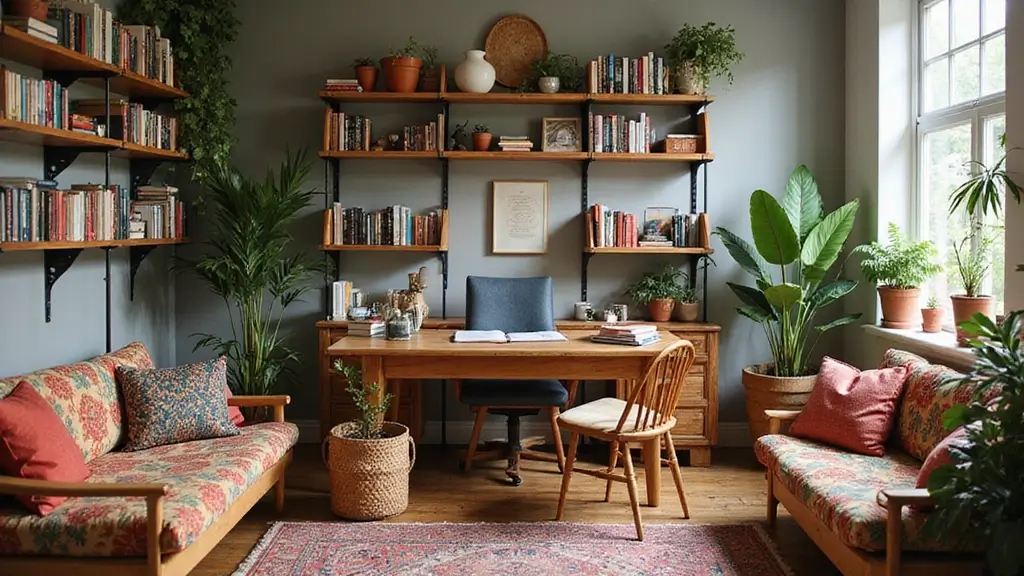
Your home office is more than just a place to work—it’s the backdrop for every Zoom call you make. How your space looks can shape how others see you and how confident you feel.
Imagine joining meetings with a neat, stylish background that makes you stand out and keeps distractions away. You’ll discover simple, effective ways to decorate your home office so it looks professional and inviting on every video call. Ready to transform your workspace and boost your Zoom presence?
Let’s dive in.

Credit: enthrallinggumption.com
Choosing The Right Background
Choosing the right background for your home office sets the tone for your Zoom calls. It impacts how others see you and your workspace. A clean, well-thought-out background helps maintain focus and shows professionalism. Your background should match your work style and personality without distracting viewers.
Simple Vs Detailed Backgrounds
Simple backgrounds keep attention on you. A plain wall or soft color works best. They avoid clutter and distractions. Detailed backgrounds add personality and interest. Bookshelves or framed photos can make your space inviting. Balance is key. Avoid overly busy or messy settings. Test your background on camera to see how it looks.
Using Shelves And Artwork
Shelves create depth and structure in your background. Arrange a few books and small decor items neatly. Artwork adds color and style. Choose pieces that reflect your taste but stay subtle. Avoid large or bright paintings that steal focus. Keep items tidy to maintain a clean look. Position shelves at eye level for best visibility.
Incorporating Plants
Plants bring life and freshness to your home office. Small potted plants fit well on shelves or desks. They add natural color and calmness. Choose low-maintenance plants like succulents or pothos. Avoid large plants that block the view. Make sure plants look healthy and well cared for. They create a welcoming, relaxed atmosphere.
Lighting Tips For Video Calls
Good lighting can make a huge difference in how you look on Zoom calls. It helps you appear clear, professional, and approachable. Let’s look at some lighting tips that improve your video call experience without needing fancy equipment.
Natural Light Benefits
Natural light is one of the best sources for video calls. It gives a soft, even glow that flatters your face and reduces harsh shadows.
Try to set up your desk near a window. Morning or late afternoon light works well because it’s gentle and warm.
If the sunlight is too strong, use a sheer curtain to soften it. You’ll notice your skin looks more natural and your eyes less strained.
Positioning Artificial Lights
If natural light isn’t available, artificial lighting can still work great. Use a lamp or ring light placed in front of you, slightly above eye level.
Avoid overhead lights alone because they create unflattering shadows under your eyes and chin. Instead, combine soft side lights or a desk lamp angled toward your face.
Using LED bulbs with a color temperature around 5000K (daylight) helps keep your skin tone looking natural on camera.
Avoiding Shadows And Glare
Shadows and glare distract others and make you appear less professional. To prevent them, balance the light sources around you.
Check your background for shiny surfaces that might reflect light into the camera. Adjust your position or cover reflective items if needed.
Keep your screen brightness moderate—too bright can cause glare on your face, too dim makes you look washed out.
Furniture And Layout
Setting up a home office for Zoom meetings requires thoughtful furniture and layout choices. Comfort and functionality are key, but appearance matters too. A well-organized space improves productivity and creates a professional backdrop for virtual calls.
Ergonomic Chair Selection
Choose a chair that supports your posture. An ergonomic chair prevents back pain and keeps you comfortable. Look for adjustable height and lumbar support. A cushioned seat adds extra comfort for long meetings.
Desk Placement For Camera Angle
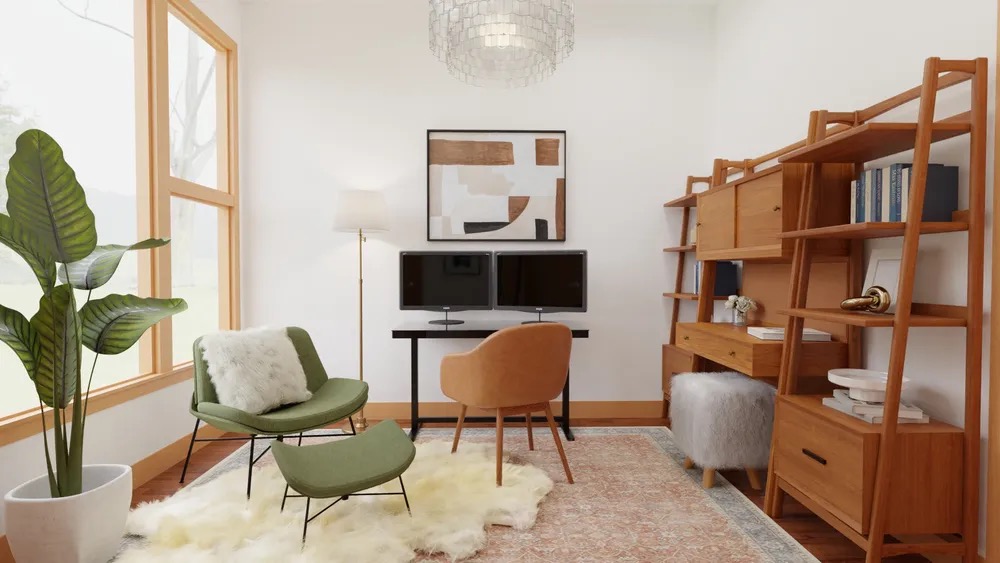
Position your desk to ensure a flattering camera angle. Avoid direct sunlight behind you, which can cause glare. Place the desk near a window for natural light. Ensure your face is well-lit and visible.
Keeping The Space Clutter-free
A tidy space enhances focus and professionalism. Use organizers to keep documents and supplies in order. A clean desk creates a neat backdrop for Zoom calls. Regularly remove unnecessary items to maintain a clutter-free environment.
Credit: www.spacejoy.com
Color Schemes And Decor
Choosing the right color schemes and decor for your home office can make a big difference in how you feel during Zoom calls. Your background sets the tone for your video presence, so it should be inviting yet professional. Balancing colors and decorations helps you appear focused and approachable, keeping your audience engaged without distractions.
Choosing Calming Colors
Soft, calming colors like light blues, gentle greens, or warm neutrals create a peaceful atmosphere on camera. These shades reduce eye strain and help you stay relaxed during long meetings. Think about what colors make you feel calm—your comfort will show through your expressions.
Try painting one wall or using a backdrop in these tones. Even a solid-colored curtain or a large fabric panel behind you can work wonders. Avoid overly bright or neon colors, as they can be harsh and distracting on screen.
Accent Pieces That Pop
Add a few accent pieces in brighter colors to make your background interesting without overwhelming it. A bold-colored lamp, a vibrant plant pot, or a piece of art can create a focal point that draws attention. These accents give your space personality and keep your background from looking flat or boring.
Be mindful of size and placement. Too many bright items can pull focus from you. Choose one or two statement pieces that reflect your style and add energy to your space.
Personal Touches Without Distractions
Including personal items helps your space feel authentic and inviting, but choose them carefully. Family photos, a favorite book, or a small sculpture can add warmth without stealing the show. Ask yourself if each item adds to your story or distracts from your message.
Keep the background tidy and uncluttered. Zoom viewers notice messy spaces, which can send the wrong impression. A clean, thoughtfully decorated background helps you come across as organized and professional, even if you’re just working from your living room.
Tech Setup And Cable Management
Setting up your home office for Zoom calls means more than just having a good chair and desk. The tech setup and cable management play a huge role in how professional and distraction-free your video meetings look. A clean, organized space with well-positioned tech gear can boost your confidence and keep your focus sharp during important calls.
Camera Positioning Tips
Place your camera at eye level to create a natural, engaging view. Too low or too high can feel awkward and less professional.
Try positioning your camera about an arm’s length away. This distance helps frame your face well without feeling too close or too far.
Check your background through the camera before meetings. Remove clutter or distracting items to keep attention on you.
Organizing Wires Neatly
Cables tangled everywhere not only look messy but can also cause frustration during setup. Use cable clips or Velcro straps to bundle wires together.
- Label your cables to identify them quickly.
- Run cables along the desk legs or behind furniture to keep them out of sight.
- Consider a cable box to hide power strips and extra cords.
Keeping wires neat saves time and reduces stress when you need to unplug or move equipment.
Optimizing Audio Quality
Good audio makes a huge difference in how you come across on Zoom. Position your microphone close enough to pick up your voice clearly without capturing too much background noise.
Use headphones with a built-in mic or an external microphone for clearer sound. This cuts down on echoes and distractions.
Test your audio before meetings by recording a quick clip or asking a colleague for feedback. Clear sound helps keep conversations smooth and professional.

Credit: food52.com
Creating A Professional Atmosphere
Creating a professional atmosphere in your home office is essential for making a strong impression during Zoom calls. It helps you stay focused and signals to colleagues and clients that you take your work seriously. Small adjustments can make a big difference in how you are perceived on camera.
Dress Code And Appearance
What you wear on Zoom sets the tone for your meetings. Choose outfits that are neat, simple, and appropriate for your role. Solid colors often work best on camera because they avoid distractions and keep the focus on your face.
Think about your grooming as well. A clean, tidy look boosts your confidence and shows respect for your audience. You don’t need to wear a full suit, but a polished appearance makes you look professional and ready to work.
Minimizing Background Noise
Noise can ruin the flow of your meeting and pull attention away from your message. Identify common noise sources in your home—whether it’s pets, appliances, or neighborhood sounds—and find ways to reduce them.
- Use noise-cancelling headphones or a good microphone.
- Close windows and doors to block outside noise.
- Inform household members about your meeting times to avoid interruptions.
Have you noticed how a quiet background helps you stay more present and engaged? Try these tips and see how your calls improve.
Setting Boundaries For Remote Work
Clear boundaries help separate work time from personal time, improving your focus during Zoom meetings. Create a dedicated workspace that signals when you’re “on the clock.”
Communicate your schedule to family or roommates so they respect your meeting times. Use visual cues like closing a door or a “do not disturb” sign to avoid interruptions.
How often do distractions break your concentration? Setting firm boundaries can help you control your work environment and maintain professionalism during every call.
Frequently Asked Questions
How Can I Improve Lighting For Zoom Calls?
Use natural light or soft LED lights facing you. Avoid backlighting or harsh shadows for a clear, professional look.
What Background Should I Choose For Zoom Meetings?
Select a clean, uncluttered background. Use neutral colors or simple décor to avoid distractions and maintain professionalism.
How Do I Reduce Noise During Zoom Meetings?
Use noise-cancelling headphones or a quiet room. Close windows and doors to minimize outside sounds for better audio quality.
What Furniture Is Best For A Zoom Home Office?
Choose ergonomic chairs and desks. Keep furniture minimal and functional to ensure comfort and a tidy, organized workspace.
Conclusion
Creating a neat and bright home office helps you feel focused and calm. Choose simple decor that suits your style and keeps distractions away. Use good lighting to make your face clear on Zoom calls. Keep your background tidy and add a few personal touches.
Small changes can make a big difference in how you look and feel online. Start with these easy steps to make your space work for you. Enjoy your Zoom meetings with confidence and comfort every day.