Are you wondering how to properly code office decorations in QuickBooks? Getting this right can save you time and keep your books accurate.
When you know exactly where to enter these expenses, you avoid confusion and make tax time easier. You’ll learn simple steps to categorize your office decorations correctly. By the end, you’ll feel confident managing your expenses and keeping your accounting on track.
Let’s dive in and make your QuickBooks work smarter for you.
Coding Office Decorations
Coding office decorations in QuickBooks helps track spending clearly. It keeps your books organized. Accurate coding shows where money goes. This helps with budgeting and tax preparation.
Office decorations include items like art, plants, and furniture. These expenses can be categorized in different ways. Proper coding avoids confusion and errors in reports.
Choosing The Right Expense Account
Select an account that matches the decoration type. QuickBooks has many default accounts for expenses. Pick one that best fits office decor costs. This keeps your financial data clean and simple.
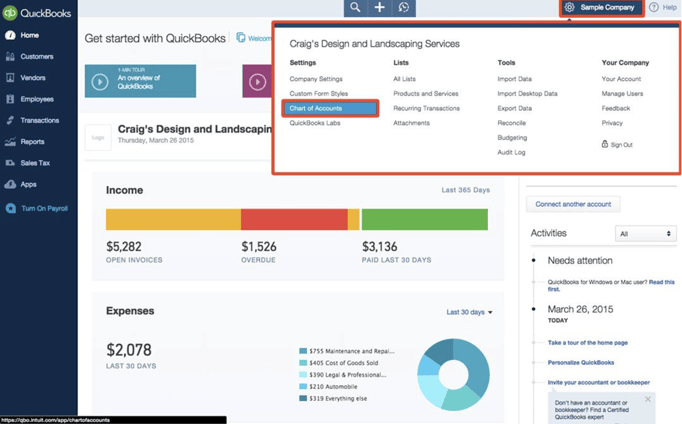
Use accounts like “Office Supplies” or “Office Expenses.” Check your chart of accounts to find suitable options. Consistency is key. Always use the same account for similar purchases.
Common Accounts For Decorations
- Office Supplies: Small decorative items under a certain cost.
- Office Equipment: Larger items like lamps or chairs.
- Furniture and Fixtures: Desks, shelves, and decorative furniture.
- Repairs and Maintenance: Decoration repairs or improvements.
Each account captures a different type of office decoration. Choose the one closest to your purchase. This helps with clear financial statements.
Customizing Accounts For Your Needs
Create custom accounts if default ones do not fit. QuickBooks allows easy account creation and editing. Name accounts clearly, such as “Office Decor” or “Workplace Enhancements.”
Custom accounts help track specific expenses better. They provide detailed reports on decoration spending. Keep account names simple to avoid confusion.
Credit: scribehow.com
Tracking Decoration Expenses
Keeping track of your office decoration expenses in QuickBooks helps you understand how much you’re investing in creating a comfortable and inspiring workspace. Accurate tracking prevents overspending and makes tax time smoother. It also provides insights into your budget allocation, so you know if you’re spending too much or just enough.
Recording Purchases In Quickbooks
Start by entering every decoration purchase directly into QuickBooks. Use the Expenseor Billfeature to log details like vendor, amount, and date. Assign these expenses to a specific category, such as “Office Decorations” or “Office Supplies,” to keep your reports clear.
If you buy multiple items in one transaction, itemize the list in QuickBooks to avoid lumping everything together. This way, you can see exactly what you bought and how much each item cost. Have you ever found yourself confused by a vague expense entry? Detailed records can save you that hassle.
Using Receipts And Documentation
Keep all receipts and invoices related to office decorations. QuickBooks allows you to attach digital copies directly to the expense entry. This means you won’t have to dig through piles of paper when reviewing your accounts.
Good documentation supports your expenses during audits and tax filings. It also helps you track warranty periods or return policies if a decoration item turns out defective. How often do you lose track of receipts? This step keeps everything organized and accessible.
Setting Up Rules For Consistency
Create rules in QuickBooks to automatically categorize decoration expenses. For example, if you frequently purchase items from a specific vendor, set a rule to assign those transactions to your decoration category. This saves time and reduces errors.
Consistency in coding expenses makes your financial reports more reliable. It also helps you compare spending month to month without confusion. Are your expense categories clear and consistent enough to give you an accurate picture of your budget?
Expense Tips For Efficiency
Managing expenses efficiently in QuickBooks can save time and reduce errors. Coding office decorations as expenses requires a strategic approach. Implementing effective methods helps streamline the process and ensures accuracy in financial tracking. Let’s explore some practical tips to enhance efficiency in coding office decoration expenses.
Batching Transactions
Batching transactions saves time by grouping similar expenses. Enter multiple office decoration costs simultaneously. This reduces manual entry and minimizes mistakes. Using batch entry is beneficial for repetitive expenses. It helps maintain an organized ledger, reducing clutter in the accounts.
Using Tags And Classes
Tags and classes allow for detailed categorization. Assign specific tags to office decoration expenses. This helps in filtering and reviewing related costs easily. Classes offer another layer of organization. Use them to separate expenses by department or project. It enhances tracking and reporting efficiency.
Regular Expense Reviews
Conduct regular reviews of coded expenses. This ensures all entries are accurate and up-to-date. Check for any discrepancies or misclassified items. Regular reviews help in identifying areas for cost control. They also maintain the integrity of financial records, supporting better decision-making.

Credit: www.dancingnumbers.com
Tax Considerations
Handling the tax side of office decorations in QuickBooks can feel tricky, but understanding the rules helps you avoid costly mistakes. Knowing which expenses you can deduct and how to categorize them correctly ensures your books are accurate and your tax filings are smooth.
Deductibility Of Office Decorations
Most office decorations qualify as business expenses if they are used solely for your workplace. You can generally deduct items like artwork, plants, or furniture that enhance your office environment.
However, keep in mind that decorations must be ordinary and necessary for your business. Extravagant or personal items usually don’t count. Ask yourself: does this purchase help my business look professional or operate better?
Separating Capital Vs. Expense
QuickBooks requires you to decide if your decoration costs are an expense or a capital asset. Small, inexpensive items usually go straight to expenses and get deducted in the year you buy them.
On the other hand, costly decorations that last several years should be capitalized and depreciated over time. This means you spread out the deduction across multiple tax years, rather than claiming it all at once.
For example, a $50 decorative lamp is an expense, but a $2,000 custom office mural may need to be capitalized. This distinction impacts your tax benefits and how your financial reports look.
Consulting With A Tax Professional
Tax laws can be complex and change often. It’s smart to talk with a tax professional who understands your business and local regulations.
A tax expert can help you code office decoration purchases correctly in QuickBooks and advise on maximizing deductions. Have you checked in with your accountant lately about your business expenses? Their insights could save you money and headaches during tax season.
Avoiding Common Mistakes
Coding office decorations in QuickBooks might seem straightforward, but it’s easy to slip up if you’re not careful. Avoiding common mistakes can save you time and prevent headaches during audits or tax season. Let’s look at some pitfalls you should watch out for to keep your records accurate and compliant.
Misclassifying Expenses
It’s tempting to lump office decorations under general supplies or miscellaneous expenses. However, misclassifying these costs can distort your financial reports and tax deductions. Instead, create a specific account for office decorations or include them under a clear category like “Office Improvements.”
Think about how you want to track these expenses over time. Proper classification helps you analyze spending patterns and budget better for future purchases. Have you checked if your current chart of accounts supports detailed tracking for your office decor expenses?
Overlooking Documentation
Receipts and invoices are more than just paperwork—they’re proof of your spending. Skipping documentation can raise red flags during an audit and make it harder to justify deductions. Always attach digital copies of receipts to the corresponding QuickBooks transactions.
Make it a habit to note the purpose of each purchase. Was it for a client-facing area or employee workspace? This extra detail can be crucial if tax authorities question the expense. How organized is your current system for storing and linking documentation?
Ignoring Company Policies
Your company might have specific rules about spending on office decorations. Ignoring these guidelines can lead to unauthorized expenses or reimbursement issues. Review your internal policies before coding any decoration-related costs in QuickBooks.
Communicate with your team to ensure everyone understands what qualifies as an acceptable office decoration. This can prevent confusion and keep your accounting clean. Are your policies clearly defined and easily accessible to employees handling expenses?
Credit: www.growthforce.com
Frequently Asked Questions
How Do I Categorize Office Decorations In Quickbooks?
In QuickBooks, categorize office decorations under “Office Expenses” or “Supplies. ” This keeps records clear and accurate for tax purposes.
Can I Track Office Decoration Costs Separately?
Yes, create a sub-account named “Office Decorations” under expenses. This helps track and manage decoration costs precisely.
Are Office Decorations Tax-deductible In Quickbooks?
Office decorations are generally tax-deductible as business expenses. Ensure they are recorded correctly in your expense accounts.
How To Code Holiday Decorations In Quickbooks?
Code holiday decorations under the “Office Decorations” or “Seasonal Expenses” category. This separates them from regular office supplies.
Conclusion
Coding office decorations in QuickBooks keeps your expenses clear and organized. Assign the right account to track costs easily. This helps you see where your money goes. Accurate records save time during tax season. They also help you plan your budget better.
Keep your entries consistent and simple. QuickBooks makes managing expenses less confusing. Stay on top of your finances with easy coding. Your business will run smoother and smarter.