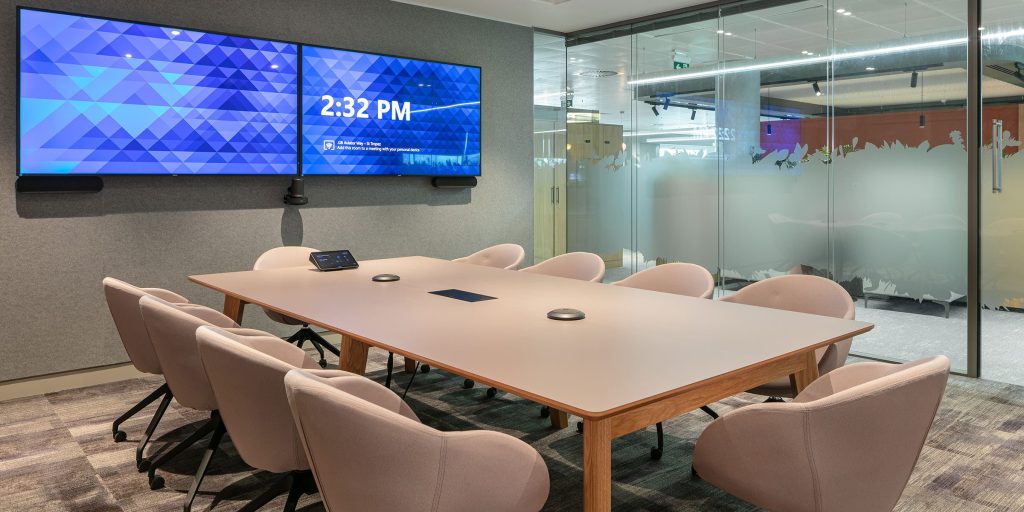
Your audio visual office is more than just a workspace—it’s where creativity meets technology. How you decorate it can boost your mood, sharpen your focus, and inspire innovation every day.
Imagine walking into a room that feels just right, where every detail supports your work and sparks new ideas. You’ll discover simple, effective ways to transform your AV office into a place that energizes you and impresses clients. Ready to create an environment that truly works for you?
Let’s dive in.

Credit: www.instagram.com
Choosing The Right Theme
Choosing the right theme sets the tone for your audio visual office. It creates a space that feels inviting and professional. The theme influences colors, furniture, and decorations. Picking a style that fits your work helps improve focus and creativity.
Consider how the theme complements your technology and equipment. It should support a productive atmosphere. Below are some popular theme ideas to inspire your design.
Modern Minimalist Style
Modern minimalist style keeps the office clean and simple. It uses neutral colors like white, gray, and black. Furniture has sleek lines without extra decorations. This style reduces distractions and highlights your audio visual gear.
Key features include:
- Open space with minimal clutter
- Simple, functional furniture
- Hidden cables and tidy setups
Tech-inspired Designs
Tech-inspired designs focus on futuristic and digital elements. Bright LED lights and metallic finishes create a modern feel. Wall art can include circuit patterns or digital graphics. This style matches well with high-tech equipment.
Important points to consider:
- Use smart lighting to enhance the mood
- Incorporate tech gadgets as decor
- Choose furniture with modern materials
Creative Color Schemes
Creative color schemes add personality and energy to the office. Bold colors like blue, orange, or green can boost mood and motivation. Use color blocks or accent walls to create visual interest. Balance bright tones with neutral shades for comfort.
Try these tips:
- Pick colors that inspire focus and calm
- Use color to define different zones
- Include colorful art or accessories
Optimizing Lighting
Soft, adjustable lighting reduces glare on screens and creates a comfortable work environment. Use LED lights to save energy and enhance focus. Position lights to highlight key areas without causing reflections or shadows.
Optimizing lighting in an audio-visual office can transform the space from ordinary to extraordinary. The right lighting can enhance creativity, improve focus, and make virtual presentations look more professional. It’s not just about brightness—it’s about creating the perfect ambiance.Natural Light Utilization
Maximize natural light in your audio-visual office. Use sheer curtains to diffuse sunlight, reducing glare on screens while keeping the room bright. Arrange desks near windows to take advantage of sunlight throughout the day. Consider the orientation of your office. Morning sun can invigorate, while afternoon light provides a warm glow. Think about how different times of day affect your work mood and adjust furniture accordingly.Accent And Mood Lighting
Accent lighting can highlight specific areas, creating focal points in the office. Use LED strips behind monitors or shelves for a sleek look. Desk lamps with adjustable brightness can provide task lighting without being overpowering. Mood lighting is key for creating a relaxed atmosphere. Think about adding a dimmer switch to control the intensity of overhead lights. Experiment with different color temperatures to find a light that suits your working style.Smart Lighting Solutions
Smart lighting offers flexibility and control. Imagine customizing your light settings with a simple voice command. Devices like smart bulbs can change color and brightness, adapting to your needs throughout the day. Set up automated lighting schedules. Create a bright setting for productive mornings and a softer glow for winding down in the evenings. Ask yourself, how could intelligent lighting transform your work environment? By optimizing lighting, you can redefine your audio-visual office as a dynamic and inspiring workspace. Embrace the light, and let it fuel your creativity and productivity.Incorporating Audio Visual Elements
Incorporating audio visual elements creates a dynamic and productive office environment. These elements help share ideas clearly and engage teams effectively. Thoughtful integration of visual and sound technologies enhances communication and collaboration.
Wall-mounted Screens
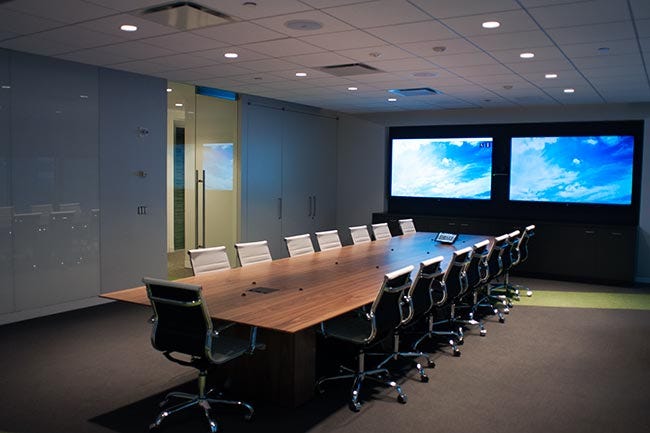
Wall-mounted screens save space and improve visibility in any room. Choose screens with high resolution for clear images and text. Position screens at eye level for easy viewing by everyone. Use multiple screens to display different content simultaneously. This setup supports presentations and video conferences effortlessly.
Integrated Sound Systems
Integrated sound systems deliver clear audio without clutter. Use built-in speakers or ceiling-mounted options to spread sound evenly. Test the system for volume and clarity in all parts of the room. Control the audio easily with remote or app-based systems. Good sound helps keep everyone focused and involved.
Interactive Displays
Interactive displays invite participation and make meetings lively. Touchscreen technology allows users to draw, write, or move objects on the screen. Choose interactive boards that connect with laptops and mobile devices. These displays encourage teamwork and quick decision-making. They turn ideas into visible, shared content instantly.
Furniture And Layout Ideas
Choosing the right furniture and layout shapes the success of any audio visual office. The setup must support long hours of work and constant use of AV equipment. Smart furniture and well-planned space improve comfort and boost productivity. The design should blend style with function. Consider seating, workstations, and storage that fit the unique needs of AV professionals.
Ergonomic Seating Options
Comfort is key for people who spend hours at desks. Ergonomic chairs reduce back and neck pain. Look for adjustable features like seat height, armrests, and lumbar support. Mesh chairs offer breathability and keep users cool. Task chairs with wheels allow easy movement around the workspace. Consider stools or standing chairs for flexible postures.
Flexible Workstations
Workstations should adapt to different tasks and team sizes. Modular desks can be rearranged quickly. Height-adjustable desks allow switching between sitting and standing. L-shaped or corner desks maximize space and keep equipment within reach. Include cable management systems to keep wires tidy. Open layouts encourage collaboration and easy access to AV tools.
Creative Storage Solutions
AV offices need organized spaces for cables, devices, and manuals. Use wall-mounted shelves to save floor space. Lockable cabinets protect valuable equipment. Rolling carts offer mobile storage for gear used in various rooms. Drawer dividers keep small items sorted. Label storage clearly for quick access during busy workdays.
Adding Personal Touches
Adding personal touches makes an audio visual office feel welcoming and unique. It helps create an environment where creativity and productivity thrive. Personal details bring warmth to the space and show the identity of the team behind it. Thoughtful decoration connects people with their work and surroundings.
Artwork And Posters
Artwork and posters add color and character to office walls. Choose visuals that inspire and motivate the team. Abstract art can spark creativity, while motivational quotes boost morale. Display pieces that reflect the company’s culture or industry. Keep the style consistent to maintain a professional look.
Branded Elements
Incorporate branded items to strengthen company identity. Use logos on walls, desks, or office supplies. Customized wallpapers or screensavers help unify the space visually. Branded cushions or mugs add subtle but effective branding touches. These elements remind staff and visitors of the company’s mission.
Plants And Greenery
Plants bring life and freshness to any office. They improve air quality and reduce stress. Small potted plants fit well on desks and shelves. Larger plants can fill empty corners and soften harsh lines. Choose low-maintenance varieties to keep the space neat and green.

Credit: www.instagram.com
Maximizing Space Efficiency
Maximizing space efficiency in an audio visual office is crucial to keep your workspace neat and functional. With all the tech gear and cables, clutter can quickly take over. Smart choices in organization and layout help you create a productive environment without feeling cramped.
Cable Management Tips
Cables can turn a sleek AV office into a tangled mess fast. Use cable trays or raceways under desks to keep wires out of sight but accessible. Velcro straps and cable clips are inexpensive tools that prevent cords from knotting together.
Labeling each cable can save you hours during troubleshooting or rearranging. Consider wireless options where possible to reduce the number of cables altogether. Ask yourself: How often do you really need every device plugged in at once?
Multi-functional Furniture
Choose furniture that serves more than one purpose to save space. Desks with built-in storage or shelves can hold AV equipment and accessories while keeping surfaces clear. Adjustable desks that switch between sitting and standing also add versatility.
Use foldable or stackable chairs that you can tuck away when not in use. A storage ottoman can double as seating and a place to hide cables or small devices. Which pieces in your office could do double duty with a small change?
Open Vs. Closed Spaces
Deciding between open and closed office areas impacts space use and workflow. Open layouts feel larger and encourage collaboration but may cause distractions with AV equipment noise. Closed spaces offer privacy and better sound control but can feel cramped.
Try using glass partitions to keep spaces visually open while containing sound. You might also designate a specific zone for noisy AV tasks and keep other areas quiet. How do you balance the need for teamwork and concentration in your office?
Technology Integration Tips
Integrating technology in an audio visual office enhances productivity and comfort. Smart tech makes the space more efficient and user-friendly. Focus on smooth connections and easy controls to create a functional environment. Choose devices that blend well with your office design and boost collaboration.
Wireless Connectivity
Wireless networks reduce clutter and increase mobility. Use strong Wi-Fi for all audio and visual devices. Place routers strategically to cover the whole office. Support multiple devices without lag or interference. Wireless connections allow easy device sharing and quick setup.
Smart Office Devices
Smart devices simplify daily tasks and improve communication. Use smart speakers for voice control of presentations and lights. Integrate smart displays for quick access to calendars and notifications. Choose devices with user-friendly apps for easy management. These devices save time and keep the office organized.
Automation Tools
Automation cuts down repetitive tasks and boosts efficiency. Set up automated lighting and temperature controls. Program meeting room schedules and reminders for smooth workflows. Use automation to manage audio and video equipment during meetings. Automation tools help maintain focus on work, not tech setup.
Credit: medium.com
Frequently Asked Questions
What Are Essential Elements For An Av Office Decor?
Essential elements include soundproofing, proper lighting, cable management, and ergonomic furniture. These improve functionality and comfort. Use stylish equipment that matches the office theme. This creates a professional yet inviting atmosphere for work and presentations.
How To Optimize Lighting In An Av Office?
Use adjustable LED lights to reduce glare on screens. Incorporate ambient and task lighting for flexibility. Natural light enhances mood but should be controlled with blinds. Proper lighting improves video quality and reduces eye strain during long sessions.
Which Colors Suit An Audio Visual Office Best?
Neutral tones like gray, white, or beige work well. Accent colors such as blue or green promote focus and creativity. Avoid overly bright colors that can distract. The color scheme should complement AV equipment and create a calming environment.
How To Manage Cables Effectively In Av Office?
Use cable trays, clips, and sleeves to organize wires. Label cables for easy identification. Keep cables off the floor to prevent tripping hazards. Effective cable management improves safety and maintains a tidy workspace.
Conclusion
Decorating an audio visual office can boost work and creativity. Keep the space neat and use good lighting. Choose colors that calm and inspire the team. Arrange equipment for easy access and comfort. Add personal touches without cluttering the room.
A well-decorated office helps everyone focus and feel good. Small changes make a big difference in daily work. Remember, balance is key to a productive space. Try these tips to create an inviting, efficient office. Your team will thank you.