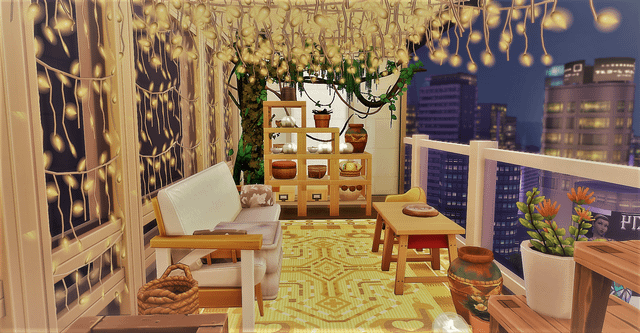
Are you ready to transform your Sims 4 home into a dazzling masterpiece? Decorating with lights can change the entire mood of your space, making it cozy, vibrant, or even magical.
But where do you start? How do you choose the right lights that fit your style and make your Sims feel truly at home? In this guide, you’ll discover simple tips and creative ideas to brighten up every corner of your Sims’ world.
Keep reading, and you’ll learn how to use lights to make your virtual space shine like never before.
Choosing Light Types
Choosing the right types of lights in Sims 4 can dramatically change the mood and style of your virtual home. Different lights serve different purposes, so it’s important to think about where and how you want to use them. Are you aiming for a cozy indoor vibe or a vibrant outdoor party atmosphere? Let’s break down the lighting options to help you make the best choice.
Indoor Lighting Options
Indoor lighting in Sims 4 comes in many forms. Ceiling lights offer bright, even illumination perfect for kitchens and living rooms. Wall sconces create soft, warm glows that work well in hallways or bedrooms.
Table lamps and floor lamps give you more control over light placement and add style to your space. Consider using dimmable lights to adjust brightness depending on the activity. Have you noticed how a well-lit room instantly feels more inviting?
Outdoor Lighting Choices
Outdoor lights are key to making your Sims’ yard look lively and safe after dark. Path lights guide Sims along walkways, while spotlights highlight garden features or architectural details. String lights add a festive touch for social gatherings or quiet evenings outside.
Don’t overlook functional lights like porch lamps or security lights that enhance realism. What kind of outdoor scene do you want your Sims to enjoy? Bright and energetic or calm and peaceful?
Specialty Lights For Ambiance
Specialty lights give you the power to craft unique atmospheres. Neon signs bring a modern, urban flair, perfect for bars or game rooms. Candles and fireplaces emit flickering light that adds warmth and intimacy to any setting.
Colored lights let you experiment with moods—try blues for calm or reds for excitement. Using these specialty lights thoughtfully can turn a simple room into a memorable space. Which vibe are you eager to create?
Placement Strategies
Placing lights carefully highlights key areas and creates a cozy atmosphere in Sims 4 homes. Using different light sources adds depth and charm to each room. Experiment with wall, floor, and ceiling lights for the best effect.
Decorating with lights in Sims 4 can transform your virtual space into a cozy haven. Understanding placement strategies is key to enhancing your environment. With thoughtful arrangement, you can highlight features, create warmth, and balance brightness.Highlighting Key Features
Strategic lighting can accentuate special elements in your home. Use spotlights to draw attention to art pieces or architectural details. Placing lights above or below these features creates a dramatic effect. Wall sconces work well for illuminating paintings or unique wall textures. For a modern look, use LED strips to frame mirrors or shelves. This technique makes these elements pop in any room.Creating Cozy Corners
Lighting can transform unused spaces into inviting corners. Use lamps with warm tones to soften harsh areas. Floor lamps or table lamps are great for reading nooks. Their glow encourages relaxation and comfort. String lights add charm to bedrooms or patios. Draping them across a wall or ceiling creates an intimate ambiance. This setup invites Sims to unwind and enjoy cozy moments.Balancing Brightness And Shadows
Achieving a balance between light and shadow adds depth. Use dimmers to control the intensity of ceiling lights. This helps in avoiding overly bright or dull spaces. Combine overhead lighting with floor lamps for layered illumination. Shadows cast by tall plants or furniture create intriguing patterns. This interplay between light and shadow gives rooms a dynamic, lived-in feel.Color And Mood
Lighting in Sims 4 plays a big role in setting the scene. Color and mood shape how your Sims feel in a room. Choosing the right light tones can make spaces cozy, bright, or calm. Experimenting with light colors changes the whole vibe.
Warm Vs Cool Tones
Warm tones like yellow and orange create a cozy feeling. They make rooms feel inviting and comfortable. Cool tones such as blue and white give a fresh, calm look. Use warm lights for living rooms or bedrooms. Cool lights work well in kitchens or offices. Mixing these tones can balance energy and relaxation in your Sims’ home.
Using Colored Lights
Colored lights add fun and personality to your Sims’ spaces. Red or purple lights bring drama and excitement. Green and blue create a peaceful, natural vibe. Use colored lights in party rooms or creative spaces. Adjust light intensity to avoid overpowering the room. Colored bulbs or light strips can easily change the atmosphere.
Mood Lighting Techniques
Layering lights enhances the mood in Sims 4 rooms. Combine ceiling lights with floor or table lamps. Use dimmers to soften bright lights. Shadows add depth and interest. Place lights near objects to highlight them. Change light placement for different moods. These simple tricks transform dull rooms into lively spaces.

Credit: www.reddit.com
Combining Lights With Decor
Combining lights with decor in Sims 4 creates a warm and inviting atmosphere. Lighting enhances the style and mood of your rooms. It highlights key furniture pieces and adds depth to your spaces. Thoughtful light placement brings your Sims’ homes to life and makes them feel cozy.
Pairing Lights With Furniture
Choose lighting that matches your furniture’s style and color. Soft lamps work well with wooden or classic furniture. Bright spotlights suit modern and minimalist designs. Use floor lamps beside sofas or armchairs for a cozy reading corner. Table lamps look great on side tables or desks. Match light tones with furniture colors to create harmony.
Using Lights In Outdoor Spaces
Outdoor lighting makes gardens and patios lively at night. String lights add charm to outdoor dining areas. Place lanterns along pathways for safety and style. Use spotlights to highlight plants or statues. Solar lights are eco-friendly and easy to install. Mix different light types to create a layered look.
Seasonal And Festive Lighting Ideas
Change lights to fit holidays and seasons for extra fun. Warm white lights create a cozy winter feel. Colored lights bring joy during festive seasons like Halloween or Christmas. Use themed lights such as pumpkins or stars for decoration. Combine fairy lights with seasonal decor for a magical touch. Turn on festive lights during special events to brighten your Sims’ home.
Practical Tips For Efficiency
Decorating with lights in Sims 4 can transform your virtual space, but efficiency is key to keep your game running smoothly and your designs looking great. Smart use of lighting not only enhances the atmosphere but also helps you manage resources and space better. Let’s dive into some practical tips that will make your lighting setup both stunning and efficient.
Managing Light Intensity
Adjusting light intensity can make a huge difference in how your rooms feel. Bright lights might look attractive but can overwhelm small spaces or cause unnecessary lag. Lowering intensity helps create a cozy vibe and reduces strain on your game’s performance.
Try dimming lights in areas where a soft glow is enough, like bedrooms or lounges. Use brighter lights only in functional spaces such as kitchens or work areas. Have you experimented with different brightness levels to find the perfect balance?
Using Lighting To Save Space
Lights don’t have to take up much room if you plan carefully. Wall-mounted lights and ceiling fixtures free up floor space for furniture or decorations. This approach keeps your Sims’ environment uncluttered and realistic.
Consider using string lights or recessed lighting to add ambiance without bulky lamps. These options are subtle yet effective, making your rooms feel larger. Think about where you can replace larger lamps with smaller or hidden light sources in your builds.
Troubleshooting Common Issues
Sometimes lights don’t behave as expected, causing flickering or dark spots. These issues often happen due to overlapping light sources or placement too close to walls. Checking your setup carefully can prevent these problems.
If you notice glitches, try moving lights slightly or switching to different types of fixtures. Clearing clutter around lights can also improve performance. Have you found certain light combinations that consistently cause trouble in your builds?
Credit: www.lemon8-app.com

Credit: www.reddit.com
Frequently Asked Questions
How Do I Add Lights To Sims 4 Rooms?
In Sims 4, open Build/Buy mode and select lighting options. Choose from ceiling, wall, or floor lamps. Place lights strategically to brighten rooms and create ambiance.
What Lighting Styles Work Best In Sims 4?
Modern, cozy, and festive styles work well. Use warm lights for comfort and bright lights for active spaces. Mix different light types for a balanced look.
Can I Customize The Color Of Lights In Sims 4?
Yes, select color-changing lights in Build/Buy mode. Customize light colors to match room themes or moods for unique decorations.
How To Highlight Outdoor Areas With Lights In Sims 4?
Use garden lamps, fairy lights, and spotlights outdoors. Place lights along pathways, patios, and gardens to enhance outdoor ambiance and visibility.
Conclusion
Decorating with lights in Sims 4 brings warmth and charm to any space. Small touches create big differences in your Sims’ homes. Experiment with colors and styles to find what fits best. Lights make rooms feel cozy and lively at once.
Enjoy brightening your Sims’ world, one light at a time. Keep trying new ideas and have fun with your designs. Simple changes can make your gameplay more enjoyable every day. Lights are easy to use and add great style quickly.
Your Sims will love the inviting atmosphere you create.