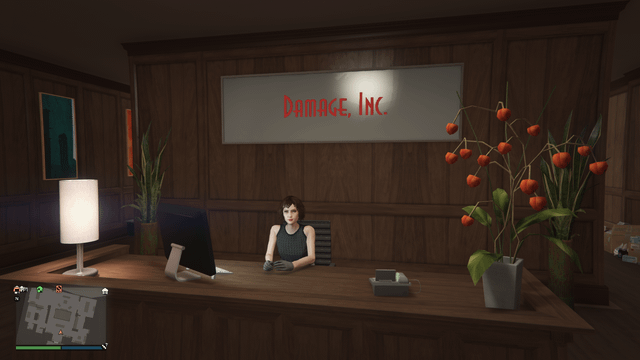
Are you tired of looking at the same old office setup in GTA? Wondering if you can switch things up and make your workspace truly yours?
You’re not alone. Your in-game office should feel fresh and exciting, just like your gameplay. Changing your GTA office decor isn’t just about style—it can boost your motivation and make your gaming experience more enjoyable. Keep reading to discover exactly how you can transform your virtual office and make it stand out.
Gta Office Decor Basics
Understanding the basics of GTA office decor is essential if you want to personalize your in-game workspace. Your office isn’t just a place to manage your criminal empire; it reflects your style and progress. Knowing what options are available helps you make choices that fit your taste and gameplay needs.
Default Office Styles
Each office in GTA starts with a default style that sets the tone for your operations. These styles range from sleek modern designs to more classic, professional looks. For example, the Maze Bank Tower has a clean, corporate feel, while the Arcadius Business Center offers a more traditional executive vibe.
The default decor includes furniture, lighting, and wall art that you can see immediately after purchase. While these are visually appealing, they may not always match your personal preferences or your character’s persona. Have you ever felt your office could better reflect your style or status?
Available Customization Options
You can change several elements in your office to make it truly yours. Rockstar Games allows you to customize:
- Wall colors and wallpaper patterns
- Furniture styles, including desks, chairs, and sofas
- Lighting options to set the mood
- Artwork and decorative items
Customization is done through the in-game laptop inside your office, making it easy to experiment. You might want a brighter, more energetic space or a darker, more mysterious one. What kind of atmosphere motivates you when managing your GTA empire?
Changing office decor isn’t just about looks—it can improve your gaming experience by creating an environment that suits your style. You don’t have to settle for the default setup. Take control and make your office a space you actually enjoy spending time in.
Credit: gta.fandom.com
How To Change Office Decor
Changing your GTA office decor can freshen up your game environment. It lets you create a space that matches your style. The process is simple and fun. You get to pick themes, furniture, and artwork that fit your taste.
Accessing The Customization Menu
Open the GTA game and enter your office. Look for the laptop or the interaction menu. Select the option that says “Office Customization” or “Decor Settings.” This opens the customization menu. Here, you can see all the options for changing your office look.
Choosing New Themes
The customization menu offers several themes. Themes change the overall color and style of your office. Pick a theme that suits your vibe. Some themes are modern, while others are classic or bold. Select a theme and preview how it changes your office.
Furniture And Artwork Selection
After choosing a theme, pick furniture and artwork. You can select desks, chairs, and shelves. Artwork adds personality to your walls. Use the menu to browse different items. Choose pieces that match your theme and style. Arrange items to create a comfortable and stylish workspace.
Cost And Requirements
Changing GTA office decor requires in-game money and completing specific missions. Some customization options unlock only after progress in the game. Costs vary depending on the type of decor chosen.
Changing the decor in your GTA office can breathe new life into your workspace, making it feel more personalized and inviting. However, before you dive into redecorating, understanding the costs and requirements involved is crucial. This section will explore how much you might spend and the steps needed to unlock more decor options.Pricing For Decor Changes
The cost of changing your office decor in GTA varies based on the type and extent of changes you wish to make. Small tweaks, such as altering wall art or furniture pieces, generally cost less. Major renovations, like changing the overall theme or layout, can be pricier. It’s similar to real-life decor changes; larger projects require more resources. Consider setting a budget before starting. This helps prevent overspending and keeps you focused on what’s important for your office aesthetic.Unlocking Additional Options
To access more decor options, some requirements need to be fulfilled in the game. Completing specific missions or reaching certain levels often unlocks additional customization features. Think of these as achievements that reward you with more creative control over your office space. This adds an exciting layer to the game, encouraging you to explore different aspects and challenges. Have you discovered all the decor options available to you? Exploring these can lead to finding the perfect style that matches your personality or business goals in the game.Tips For Effective Customization
Customizing your GTA office decor can transform your in-game experience, making it feel more personal and functional. Effective customization isn’t just about looks; it’s about creating a space that reflects your style and boosts your productivity. Here are some practical tips to help you tailor your GTA office to suit your preferences and needs.
Matching Decor With Your Style
Your GTA office should speak to who you are. Choose furniture and decorations that align with your personality—whether that’s sleek and modern or bold and colorful.
Think about the colors and themes you enjoy. Do you prefer minimalist setups or something more eclectic? Experiment with different wall art, lighting, and desk accessories to find a balance that feels right for you.
Don’t be afraid to mix styles. A touch of vintage furniture paired with contemporary tech can create a unique vibe that stands out from the usual GTA office designs.
Maximizing Office Functionality
Functionality can be just as important as aesthetics. Ask yourself: does your office setup help you complete tasks efficiently or does it get in the way?
Organize your space with useful items like storage units and work surfaces that help you stay focused. For instance, placing filing cabinets near your desk can save time hunting for important documents in the game.
Lighting is another key factor. Bright, adjustable lights reduce eye strain and help you spot details better during missions or strategy planning. Small changes like this can significantly improve your gameplay experience.
Common Issues And Fixes
Changing your GTA office decor can sometimes be tricky due to various glitches and technical hiccups. These common issues can stop you from customizing your space the way you want, which can be frustrating after investing time and effort. Understanding these problems and knowing how to fix them helps you get back to styling your office quickly.
Decor Change Glitches
One frequent glitch is the decor not saving after you make changes. You might pick a new style or furniture, but when you leave and return, everything resets to the original look.
Another issue is the game freezing or crashing when trying to access the decor menu. This can happen due to software bugs or conflicts with game updates.
Sometimes, certain decor options won’t appear or load properly, leaving your choices limited or causing visual errors.
Troubleshooting Tips
- Restart the game:This simple step can fix many temporary glitches and refresh your session.
- Check for updates:Make sure your game is updated to the latest version, as patches often fix decor-related bugs.
- Clear cache:On consoles and PCs, clearing the cache can solve loading issues and improve performance.
- Revisit the decor menu:Try exiting and re-entering the decoration area to force the game to reload the options.
- Verify game files:On PC, use your platform’s verification tool to repair corrupted files that might cause glitches.
Have you ever lost your favorite office design to a glitch? What did you do to fix it? Sharing your experience might help others facing the same problem.

Credit: www.tiktok.com
Additional Personalization Features
Additional personalization features in GTA office decor let you go beyond simple style changes. These options help you tailor your workspace to fit your taste and boost your gaming experience. Changing your office isn’t just about looks; it’s about making the space feel truly yours.
Office Upgrades
Office upgrades add functional and visual improvements to your GTA workspace. You can add items like new furniture, tech gadgets, and wall art to create a more dynamic environment.
These upgrades often come with practical benefits. For example, adding a high-tech security system can protect your in-game assets. Plus, some upgrades unlock special features or missions that enhance gameplay.
Employee Customization
Your employees aren’t just background characters; you can customize their appearance and outfits to match your office vibe. Changing their uniforms or styles can make your team stand out and reflect your brand personality.
How you dress your staff might even affect how you feel about your office. A professional, sleek look could boost your motivation, while a casual, fun style might keep things light and creative.

Credit: www.reddit.com
Frequently Asked Questions
Can Gta Office Decor Be Customized By Players?
Yes, GTA allows players to customize office decor. You can change furniture, lighting, and wall art to suit your style. Customization adds a personal touch and enhances your gaming experience.
What Items Can Be Changed In Gta Office Decor?
In GTA, you can change desks, chairs, rugs, and wall decorations. Each item has multiple styles and colors, allowing for diverse office looks. This variety helps create a unique and personalized workspace.
Is Changing Office Decor In Gta Free Or Paid?
Most basic office decor changes in GTA are free once unlocked. However, premium items or special themes might require in-game currency purchases. This system balances customization with gameplay progression.
How Do Office Decor Changes Affect Gameplay In Gta?
Office decor changes do not impact gameplay mechanics. They serve aesthetic purposes, making your office visually appealing. A well-decorated office boosts player satisfaction but doesn’t influence missions or earnings.
Conclusion
GTA office decor can be changed, but options are limited. Players can select from a few styles to personalize their space. This adds a small touch of creativity to the game. It keeps the office feeling fresh and less boring.
Changing decor does not affect gameplay or missions. Still, it offers a nice way to express taste. Small changes like these make the game more enjoyable. Overall, customizing office decor is simple and fun to try. Give it a shot and see what fits your style.